
You can keep your facts in one place and update them once.
Put your product details, bio, or pricing in one place. Every prompt that uses them gets the current version, so when a fact changes, you change it once.
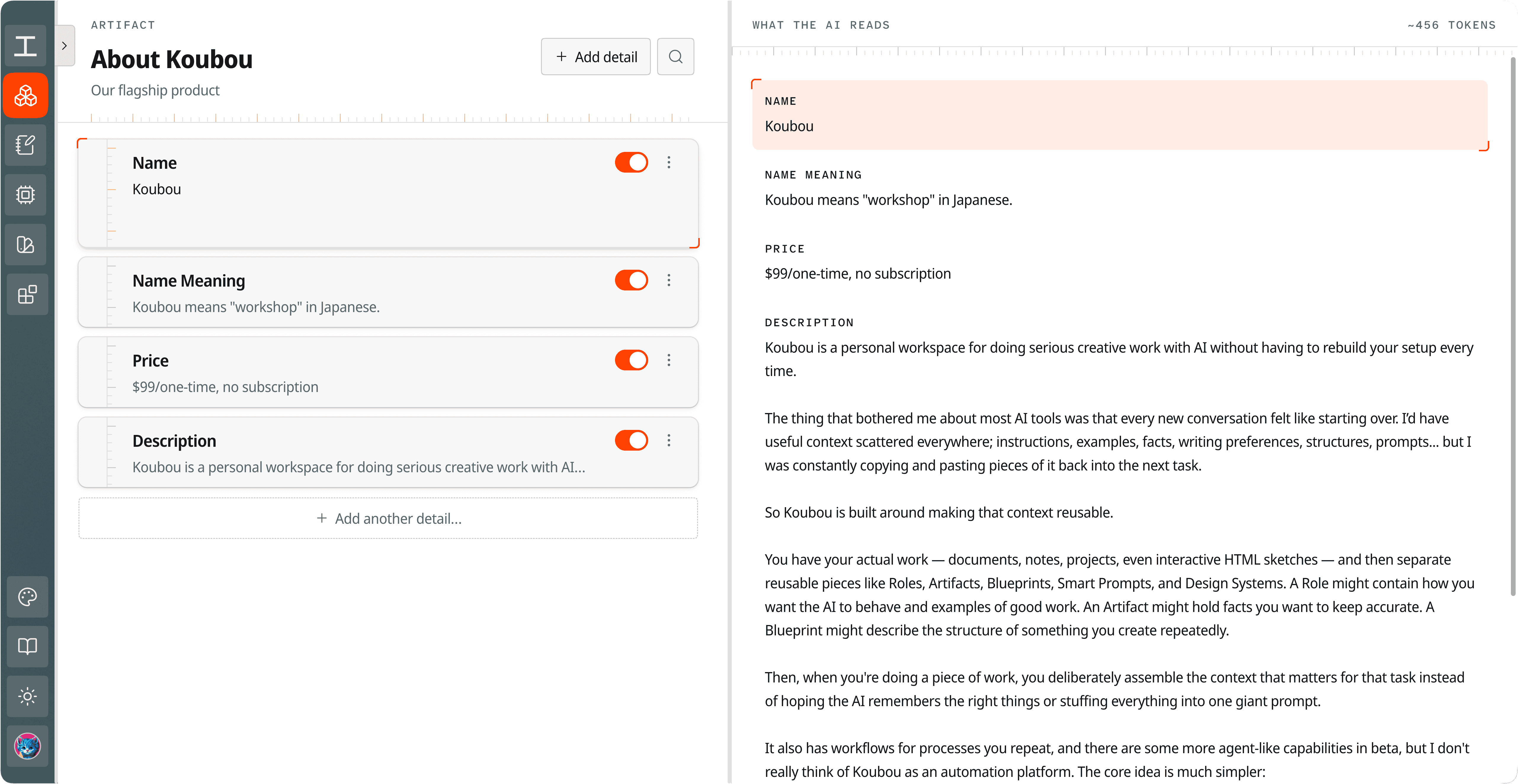 View full screenshot
 Wrong facts are the worst AI mistake.
AI makes things up when it does not have the facts. So you paste them in. Then the price changes, and the old price is still sitting in a dozen saved prompts and chats.
With an Koubou termArtifactFacts you reuse, like a product sheet, a bio, or your pricing. Each detail has its own on and off switch., the facts live in one place. Prompts point to it instead of holding their own copy. Change the price once, and the next run of every prompt uses the new one.
How it works in Koubou.
Make an Artifact
Give it a name, like BusinessDetails, and add each fact as its own field: price, phone number, product description, and so on.
Use it in any prompt
Add {{artifact.BusinessDetails}} to a prompt for the whole thing, or {{artifact.BusinessDetails.phone}} for one field. You can also attach it to a Koubou termRoleWho the AI should be for a task. It holds a voice, rules, good and bad examples, attached knowledge, and, if you want, its own model. or in the Koubou termWrite toolThe panel beside your document where you type a request to AI and choose where the answer goes..
Turn fields on or off
Each field has a switch. Turn off what a task does not need, and see exactly what the AI will read, with a token count.
Update it once
Edit a field, and every prompt that uses the Artifact gets the change on its next run.
One edit, every prompt
Step 1 BusinessDetails
- Starter plan
- $59 a month (was $49)
Step 2 Launch email, pricing page, sales reply
- Next run
- All say $59
Compared with ChatGPT and Claude.
In ChatGPT or Claude
- Project files are copies. When a fact changes, you upload a new file to every Project that uses it.
- Facts pasted into saved prompts and old chats stay out of date.
- Memory may keep some facts, but you don't choose which ones a chat uses.
In Koubou
- Facts live in one Artifact, and prompts point to it.
- One edit reaches every prompt that uses it.
- You choose which facts each task gets, down to single fields.
Get Koubou for $99.
Pay once, with no subscription. AI usage is billed by your provider, not by Koubou. If it is not right for you, you have 14 days to get a full refund.